Don’t take the bait. Check before you click.
There has recently been an uptick of sophisticated phishing attempts reported on-site by scammers impersonating VGen staff.
They have been reported to use DMs and commission requests to ask users for account verification before trying to redirect users off-site to scam websites to collect banking info.
These scammers seem to be targeting many internet platforms (and even banking sites), so this is a gentle reminder to always practice general internet safety measures, including on VGen.
Important Safety Tips
1. Official VGen staff members will always have an OFFICIAL STAFF badge displayed on their profile if they do contact you.
Check profile + click on badge to double check legitimacy. The only official VGen accounts are https://vgen.co/VGen and https://vgen.co/VGenSupport.
2. Do not click on any unfamiliar links leading you off-site
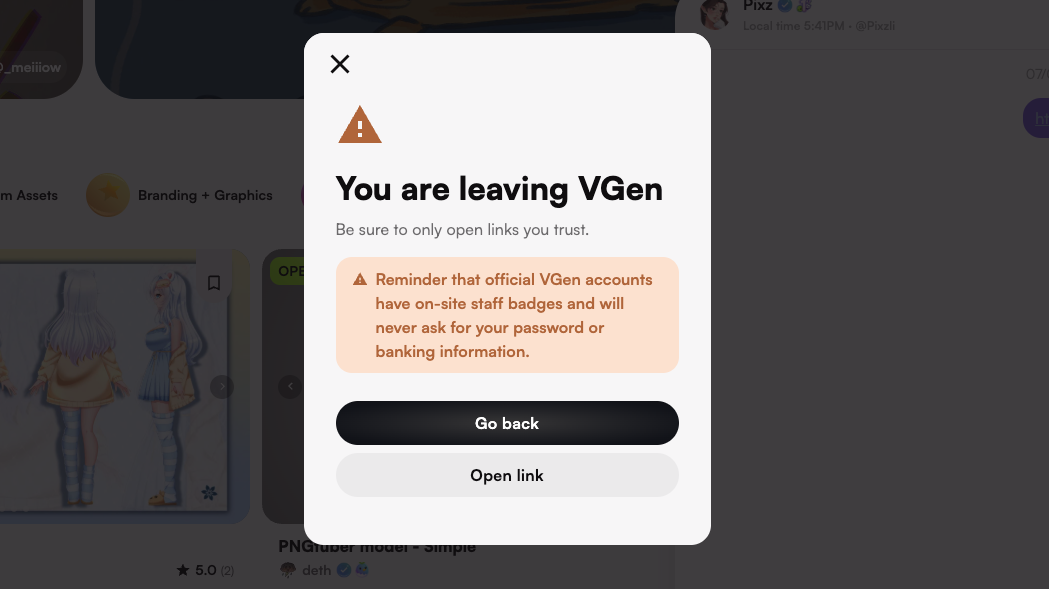
Always double-check the full domain name in your browser (not just skim for known keywords) to see whether it is the official website / recognizable platform.
If the segment immediately before the ".com" / ".co" / etc is not an official domain (ie. "vgen.co"), even if the official name is in the entire domain (ie. "vgen.randomname.co"), proceed with extra caution.
3. Do not provide any personal / banking info via DM
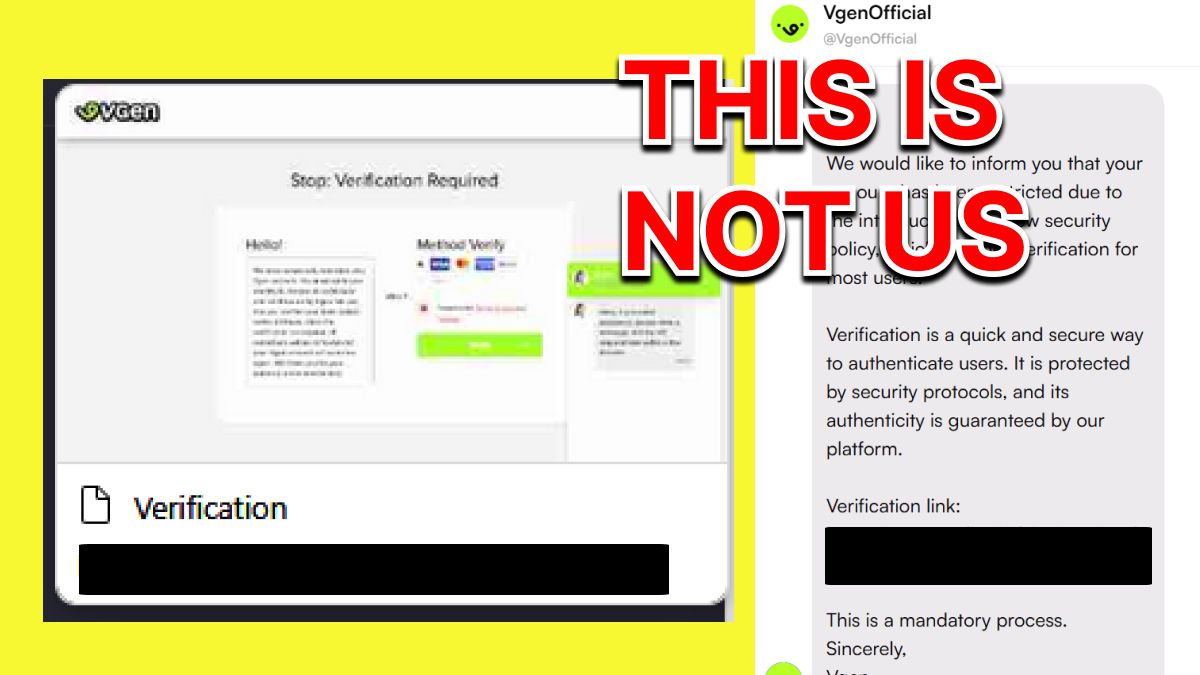
The website may look legitimate, but we will NEVER request any information this way. These are always FAKE.
Please feel free to disregard and ignore messages from that account going forward. However, if you did provide any payment or banking information, we strongly recommend that you contact your bank to inform them and have your information changed / updated as soon as possible. If charges were applied to your account as part of this scam, please also file a chargeback through your card provider.
4. Update any compromised passwords + enable 2FA
Accounts can be compromised due to data breaches on other websites, so please update / use different passwords + enable 2FA whenever possible.
5. Watch for fake emails, QR codes, and impersonation attempts
Scammers have started impersonating both artists and clients, as well as fake “VGen support” or “verification teams”, to trick users into sharing banking details or sending payments outside of VGen.
VGen will never ask you to pay a fee, load a specific balance onto your card, or scan a QR code in order to verify your account, prevent a ban, or release funds. Any message asking you to do this is not from us.
Official emails from VGen come only from @vgen.co email addresses. We do not use “affiliate” or partner emails on other domains such as Gmail or Outlook. If an email address or website link looks even slightly different from our official domain, treat it as suspicious.
Whenever possible, keep communication between artists and clients inside VGen DMs and keep all payments on VGen. This makes it much easier for our team to investigate and protect you if something goes wrong.
Other common Scam Tactics to Watch For
As scammers get more creative, we want to make sure you know exactly what to look out for. Here are some of the most common tactics we've seen recently.
1. "I accidentally reported your account"
This is one of the most common ones right now. You might receive a DM from someone claiming they "accidentally reported" your VGen account and that you need to contact a specific person (often pretending to be a "Licensed & Certified VGen Support ", "VGen Custody Support" or similar) to resolve it. This typically includes a screenshot of an altered or completely fake email impersonating our official support channels
This is a scam. They are trying to collect your personal, PayPal, or banking information by directing you to a fake support account. There is no such thing as "VGen Custody Support" and we do not handle reports this way.
Do not send anything. Do not contact the account they link you to. Simply report the message and move on.
2. "Verification fee" or payment requests
Accounts claiming to be VGen staff may ask you to pay a fee to "verify" your account, prevent restrictions, or unlock features. Some will even send official-looking emails or fake invoices to make it feel real.
VGen will never ask for payment for account verification. There are no fees associated with verification, account recovery, or preventing bans. If someone asks you for money in exchange for any of these things, it is not us.
You can read more about how to become a verified artist+ here.
3. "Notifications from support" with PDFs or QR codes
Some scammers will send you DMs pretending to be official VGen support notifications, often with attachments like PDFs, fake email screenshots or QR codes. They'll ask you to download a file, open a link, or scan a code to "verify your account" or "resolve an issue."
These are not from us. VGen support will never send you PDFs, QR codes, or other file downloads through DMs. Our actual support is handled through help@vgen.co, help-desk chat, or the official VGen Discord Server. Official staff accounts on VGen will always have a Staff Badge.
Do not open any files or scan any codes. Report the account immediately.
4. Fake "VGen" Discord servers
We've spotted a fake Discord server claiming to be VGen and impersonating VGen staff. We DO NOT have any kind of secondary or backup community server. Our official Discord is our one and only community server.
This is a scam. Anyone pointing you to another "VGen" server, or claiming to be staff inside one, is not us.
If you're ever unsure, check for official VGen staff accounts (they always have a Staff Badge on VGen) or send a ticket through our website. Don't fall for fakers!
If you come across any suspicious accounts, please report them on-site by clicking the [...] button in DMs.
Please avoid creating tickets on Discord and use the method above so it doesn't spam our mod team and instead goes straight to our support team, who can ban them ASAP~
If your account has been compromised, please create a ticket by emailing us at help@vgen.co, and our support team will help you recover your account.
Stay safe and protect yourself online!